Fire Risk Map
3. Perform Analyses
After completing the steps in chapter 2, you should have all the data needed to perform the analyses of chapter 3. In this chapter we will start by calculating the NDMI from satellite bands B8A and B11. After that we will calculate the slope in our study area from the Elevation layer. You will create a buffer around the Building and Road vectors and convert them into rasters. The LandCover layer is already usable as is, so we won’t need to do anything with it in this chapter.
Before starting this chapter, check if the following layers are present in you Layers Panel:
- Area
- B8A
- B11
- Elevation
- LandCover
- Roads_Vector
- Buildings_Vector
All layers should have the CRS set to EPSG: 32752, if this is not the case, the data won’t all be applied to the exact same location and the analyses will go wrong. Also important for the B8A, B11, Elevation and LandCover layer is that the resolution is the same; 30 by 30 pixels. You can check both the pixel size and the CRS by right clicking on a layer in the Layer Panel and clicking on Properties. You will get a pop-up screen. Under the Information tab you will find what the Pixel Size and the CRS of the layer is.
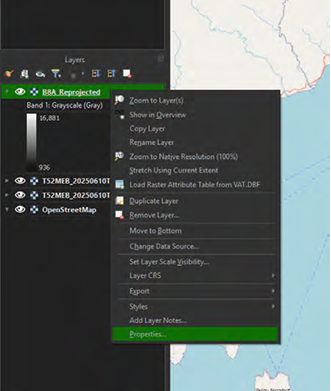
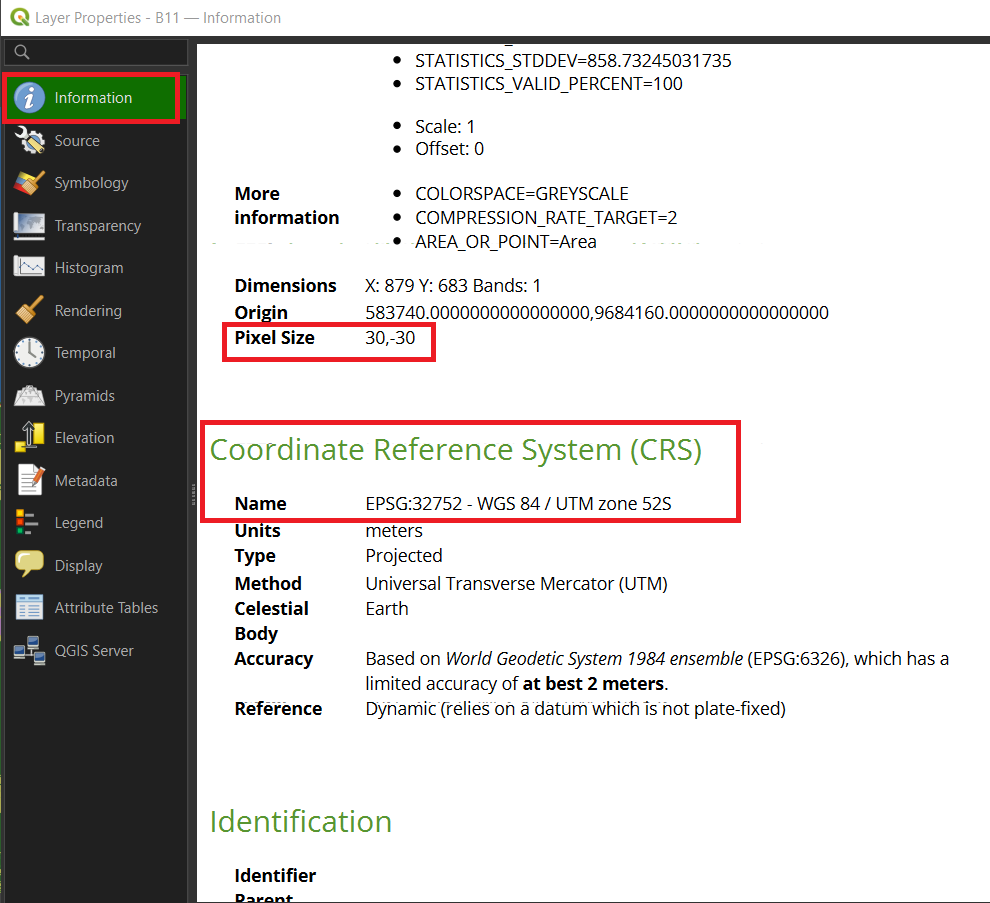
If it shows something other than 30, -30 for the Pixel Size or EPSG: 32752 for the CRS, this means something went wrong with the Reprojection of the layer. You will have to go back to the Reprojecting Step of the layer in chapter 2 and repeat it.