Tutorial: Introduction to GDAL
5. Convert GIS formats
5.2. GDAL raster pipeline
The last example of the previous section would have been more efficient if it could be run at once, without writing the intermediate step of changing the data type. For these purposes, there is the gdal raster pipeline command.
Let's apply it to the entire workflow that does the following steps without writing the intermediate results to disk:
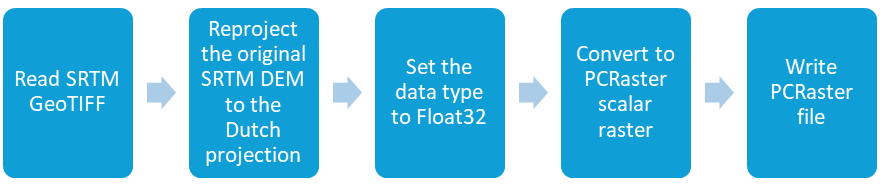
First we need to delete the existing intermediate results to be sure that we create new data.
- Execute the following command to delete all files starting with
dem:del dem*.*
2. Now we can write the pipeline:
gdal raster pipeline read srtm_37_02.tif ! reproject -d EPSG:28992 ! set-type --ot Float32 ! write dem_rd.map -f PCRaster --co VS=SCALAR
Explanation:
- The command to create a raster pipeline is
gdal raster pipeline. - We have to start with reading the input raster:
read srtm_37_02.tif. - Each following processing step needs to be indicated by
!. - First we reproject:
reproject -d EPSG:28992. - Then we set the data type of the result of that step to Float32:
! set-type --ot Float32. - Next we write the result to PCRaster format with scalar data type:
! write dem_rd.map -f PCRaster --co VS=SCALAR.

In conclusion: pipelines are an easy way to create workflows that can be executed in one go. In combination with batch files this can be very easy and powerful without the requirement to write scripts in Python.