Tutorial: Remote Sensing Image Classification with QGIS
3. Preparing Ground Truth Data
3.1. Load Reference Vector Data
Before we can delineate polygons with their class information, we need to load:
- The boundary of the study area
- A point dataset with groundtruth information
- A backdrop from which we can delineate the polygons
The boundary polygon and point dataset can be found in a GeoPackage that you can download here or from the main course page.
- Open QGIS Desktop with an empty project.
- Go to the Browser panel and locate the GeoPackage file that you have downloaded.
- Drag the Gharbia Study Area and summer_crop_samples layers from the Browser panel to the map canvas.
Note that the ground truth points only cover a part of the Gharbia area. Also note that the project is EPSG:32636, which is UTM Zone 36 North / WGS-84.
Let's inspect the attribute table of the summer_crop_samples.
4. In the Layers panel click right on the summer_crop_samples layer and choose Open Attribute Table from the context menu.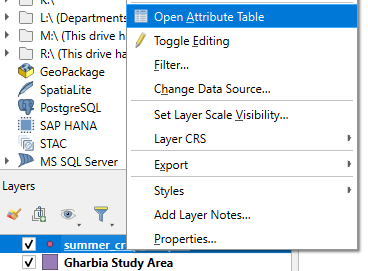
Which land-cover classes are in the ground truth data?
In the next section we'll add a backdrop.