Tutorial: Introduction to GDAL
3. Retrieving information from GIS data
3.1. Retrieve information from raster data
One of the easiest and most useful commands in GDAL is gdal
info. When given a raster, vector or multidimensional raster dataset as an argument, it retrieves and prints all relevant information that is known about the file. This is especially useful if the GIS data contains additional tag data, as is the case with TIF files. When working with satellite imagery, this is an extremely useful way of keeping track of the images location in long/lat coordinates as well as the image projection. Although the command gdal raster info existis for rasters, gdal info is a shortcut that can detect if your input is raster or vector. Therefore, you don't need to specify raster or vector in the command..
1. Execute the following command:
gdal info srtm_37_02.tif <ENTER>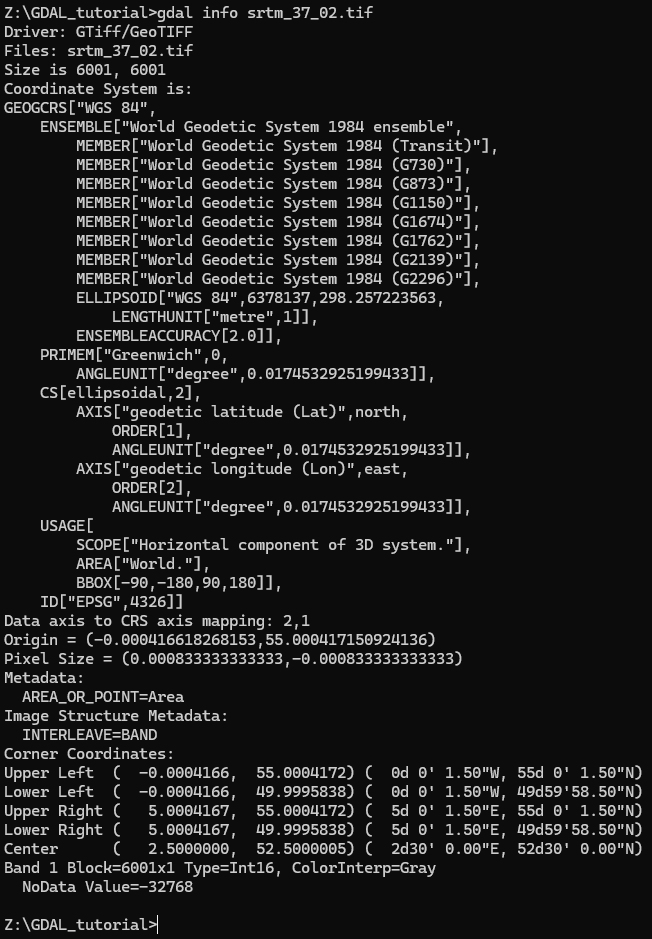
2. Try to answer these questions, based on the info printed on the screen:
- What is the size of the image?
- What is the coordinate system?
- What is the EPSG code?
- What is the NoData value?
- What is the data type?
More info on using the
gdal
        info
command can be found at https://gdal.org/en/stable/programs/gdal_info.html#gdal-infoEPSG codes are used to define projections. More info in the video below.