Tutorial: Introduction to GDAL
6. Spatial queries of vector data
For our map of Delft we want to do the following GIS analysis:
- Select the municipality of Delft from the municipality map (gem_2011_gn1.shp) and save it into a geopackage;
- Clip the road road map of the Netherlands with the polygon of the municipality of Delft.
gdal vector sql command.
SQL stands for Structured Query Language, and it’s the standard language used to work with relational databases. In GIS, you encounter SQL whenever you filter features, select attributes, join tables, or run spatial queries.
At its core, SQL lets you:
-
Retrieve data (e.g.,
SELECT * FROM municipalities) -
Filter data (e.g.,
WHERE GM_NAAM = 'Delft') -
Update or modify data
-
Create or delete tables
gdal info or QGIS to answer this question.gdal vector sql gem_2011_gn1.shp delft.gpkg --output-layer municipality --sql "SELECT * FROM gem_2011_gn1 WHERE GM_NAAM = 'Delft'"SELECT * FROM gem_2011_gn1 WHERE GM_NAAM = 'Delft' and is asking the database to return all rows from the table gem_2011_gn1 where the column GM_NAAM has the value Delft. Note that Delft is in single quotes to indicate that we're looking for a string (text).roadsreprojected.shp vector so it only covers the municipality of Delft. We use the gdal vector clip.gdal vector clip roadsreprojected.shp delft.gpkg --update --like delft.gpkg --like-layer municipality --output-layer roads_delft
-
gdal vector clip→ the GDAL subcommand to clip vector features. -
roadsreprojected.shp→ the input shapefile containing road geometries. -
delft.gpkg→ the GeoPackage that contains the clipping layer (in this case, the municipality boundary). -
--update→ tells GDAL to update the existing GeoPackage instead of creating a new file. -
--like delft.gpkg --like-layer municipality→ specifies that the clipping should use the layer called municipality insidedelft.gpkgas the mask. -
--output-layer roads_delft→ the name of the new layer that will be written into the GeoPackage, containing only the roads clipped to the Delft municipality boundary.
dem_rd.map), the clipped road map (roads_delft) and the community of Delft (municipality).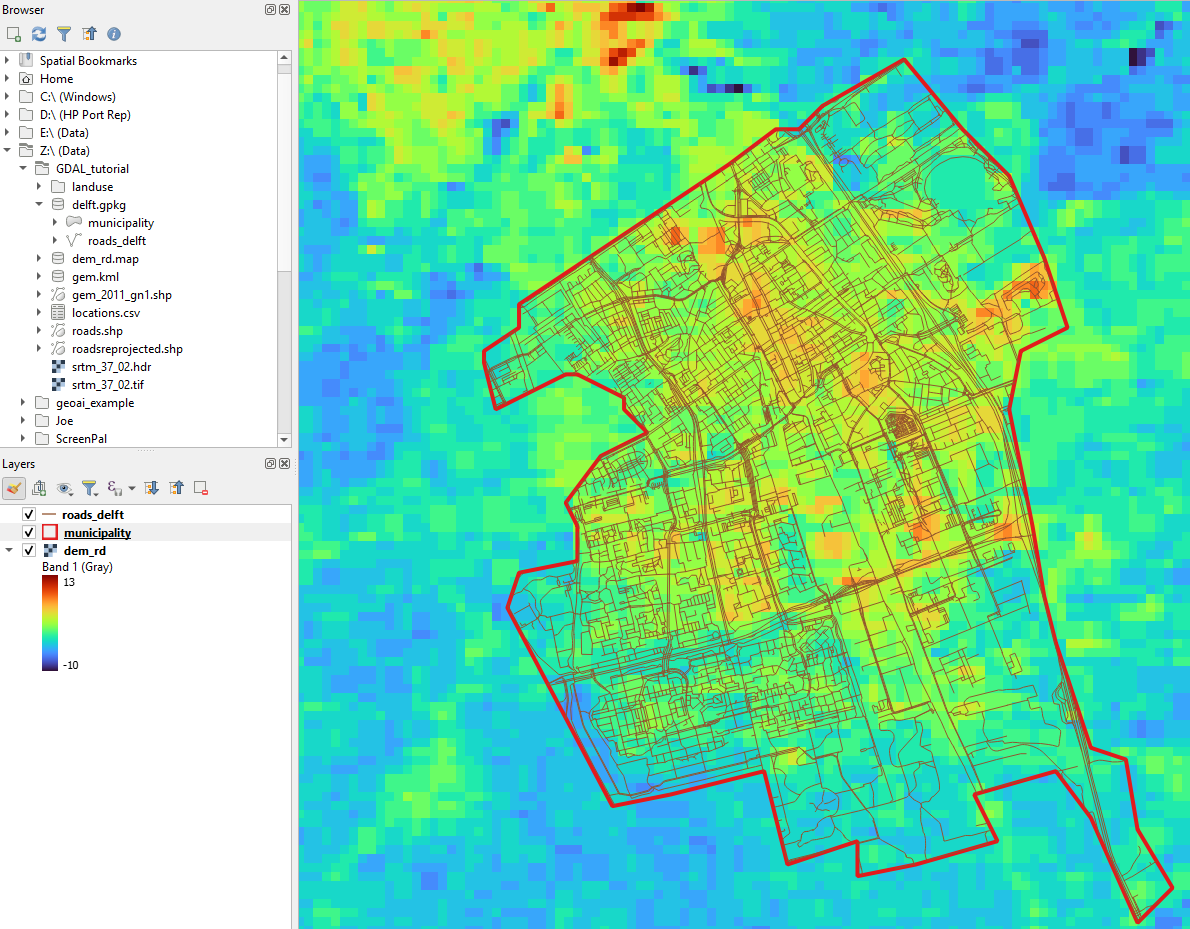
If you check the documentation of gdal vector clip, you'll notice that you could have taken a shortcut. We can add the SQL query to lookup the municipality of Delft to the command.
Let's create the result now as a shapefile so we can compare it with the previous result in the geopackage.
5. Execute the following command:
gdal vector clip roadsreprojected.shp roads_delft.shp --like gem_2011_gn1.shp --like-sql "SELECT * FROM gem_2011_gn1 WHERE GM_NAAM = 'Delft'"6. Add roads_delft.shp to QGIS and compare it with the previous result. It should be the same.