
Preprocessing a DEM and calculate flow direction
5. Fill Sinks and Calculate Flow Directions
5.1. Fill Sinks (Wang & Liu)
Since QGIS 3.44, a native tool for Fill Sinks with the Wang & Liu algorithm is available in the Processing Toolbox. The implementation is the same tool that was originally provided by SAGA.
1. In the main toolbar, click  to open the Processing Toolbox panel.
2. Go to Raster terrain analysis | Fill sinks (Wang & Liu).
3. In the dialog, make sure the Input layer is dem_subset, change the Minimum slope (degrees) to 0.01, because the default value generally doesn’t give good results. For this exercise, we’re only interested in the flow direction, therefore uncheck Open output file after running algorithm for the filled DEM and watershed basins. Name the Output layer (flow directions) flow_direction_saga.tif.
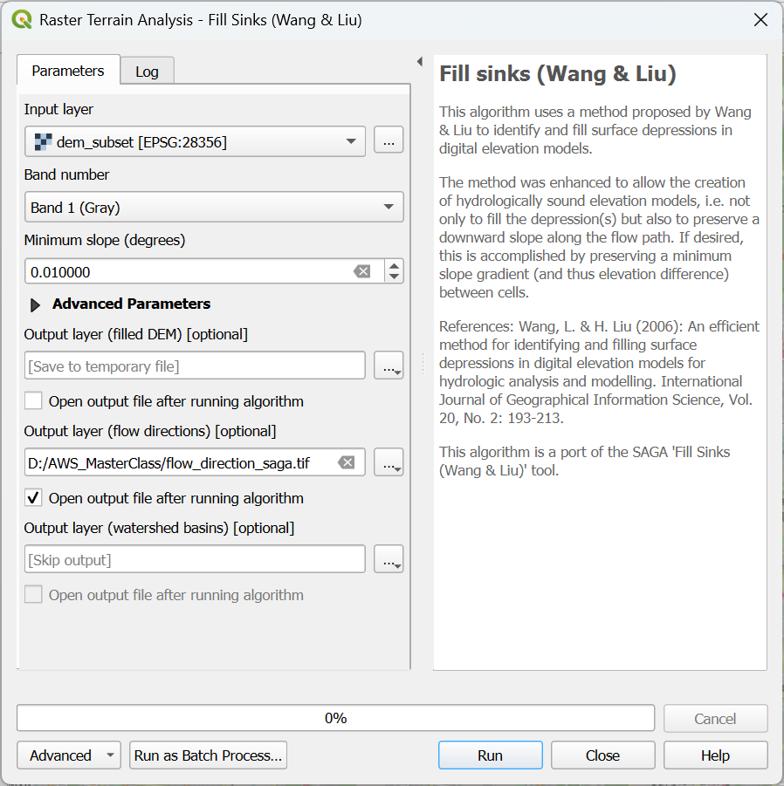
4. If your dialog looks like the screenshot, click Run. After processing click Close to close the dialog.
5. Drag the flow_direction_saga layer to the top of the Layers panel.
Next, we'll style the flow directions with arrows.